

Have a question that should be included here? Let us know!
Order transcripts? View Answer
There are several ways, depending on what you want. See the options
Order a verification letter? View Answer
Getting an enrollment verification letter is easy, just complete the Enrollment Verification Request Form and submit to the Registrar’s Office.
Check for holds on my account? View Answer
- Log on to my.longwood.edu.
- Click the Student tab.
- Under Registration Tools, click:

- Under Select Term, click Submit.
- You will see the following message:

- At the bottom, center of the page, click the [View Holds] link.
- Your hold definition will be displayed, along with the office to contact:

Add or drop a class? View Answer
Be sure to check out important information about who is eligible to make schedule changes - see below*
- Log on to my.longwood.edu.
- Click the Student tab.
- Under Registration Tools, click:
- In the Select Term drop down menu, choose the appropriate term and click Submit.
- Follow the given instructions as applicable:
- To add a class, enter the Course Reference Number in the Add Classes section.
- To drop a class, use the options available in the Action pull-down list.
- To find the Course Reference Number, choose the Class Search link.
If the class is closed – complete the Schedule Change Form with the appropriate signatures and submit to the Registrar’s Office.
If you can’t drop a class because of a hold – contact the Registrar for assistance.
Using Self Service Registration and Time Tickets:
New Students, New Transfer Students and Reenroll Students:
- Register for classes during orientation. Once you check into orientation, a time ticket will be assigned. If you need to change a class prior after orientation, you need to contact your advisor or department chair.
Students who have earned 45 or fewer credits and Social Work Majors (regardless of credits earned), must obtain pin from advisor:
- Meet with your advisor (sign up sheets available with advisor)
- During Advisement Meeting review selected classes (reminder: have alternates)
- Obtain pin number
- Register for class via my.longwood when your assigned time ticket opens
Students who have earned 46 or more credits and are not Social Work Majors:
- Speak with advisor to ensure you are on track for degree completion in four years
- Layout course plan
- Register for class via my.longwood when your assigned time ticket opens
Undeclared:
- Must meet with your advisor in the University Career Center
- Obtain pin number
- Register for class via my.longwood when your assigned time ticket opens
Check my progress towards degree completion? View Answer
Use our new degree audit tool, Degree Works.
Look for courses I need to register for that apply to a degree? View Answer
Use our new degree audit tool, Degree Works.
View new academic requirements if I was to change my major or add a minor? View Answer
Use our new degree audit tool, Degree Works.
Check my grades when they are posted? View Answer
They are typically available on my.longwood.edu about a week after finals.
You can find your grades in Degree Works or your degree evaluation (Student tab > Registration Tools) or by clicking Final Grades in the Student Shortcuts channel of the Student tab.
View my Longwood bill? View Answer
- Log on to my.longwood.edu.
- Click the Student tab.
- Under My Student Account, click the My Student Account link
- Scroll down to the bottom and click the button labeled "Click Here to View Your Account Information."
Make a payment to my account? View Answer
- Log on to my.longwood.edu.
- Click the Student Tab.
- Under My Student Account, click the My Student Account link
- Scroll down to the bottom and click the button labeled "Click Here to View Your Account Information."
Change my password? View Answer
Use Cyphir, our self service system!
Replace my Lancer I.D.? View Answer
See our Lost ID Policy.
View my financial aid awards and requirements? View Answer
- Log onto my.longwood.edu.
- Click the Student tab.
- Under My Financial Aid Account, click on one of the following links:
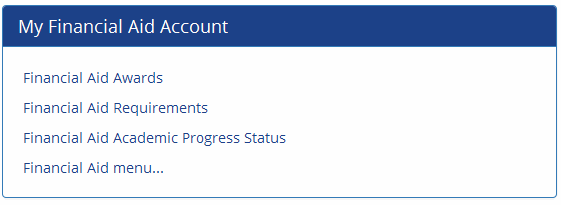
Estimate my tuition costs? View Answer
Use our net price calculator.
Apply for financial aid / FAFSA? View Answer
It’s done online through the federal government. Check out Longwood’s tips on applying for aid.
Find and use the Longwood People Directory or A-Z Site Index? View Answer
The people search is available at the top of each Longwood webpage (just select "People" and search). The A-Z Index can be found at the bottom of each Longwood webpage.
Use the Center for Academic Success (Writing Center in Library)? View Answer
Drop in during our open hours. Be sure to come prepared!
Learn to write a resume or plan for my internship? View Answer
We have great resources on the Career Success website and in Maugans.
Obtain a parking decal/hangtag? View Answer
Instructions on how to order / reserve a parking decal can be found on the Parking Services website. Please note that freshman students are restricted from having a vehicle at Longwood except for special instances with prior approval.
Make a suggestion, complaint, petition or appeal? View Answer
There are several ways, depending on the issue. See the options